
Batch
Batch
Step 1 of 4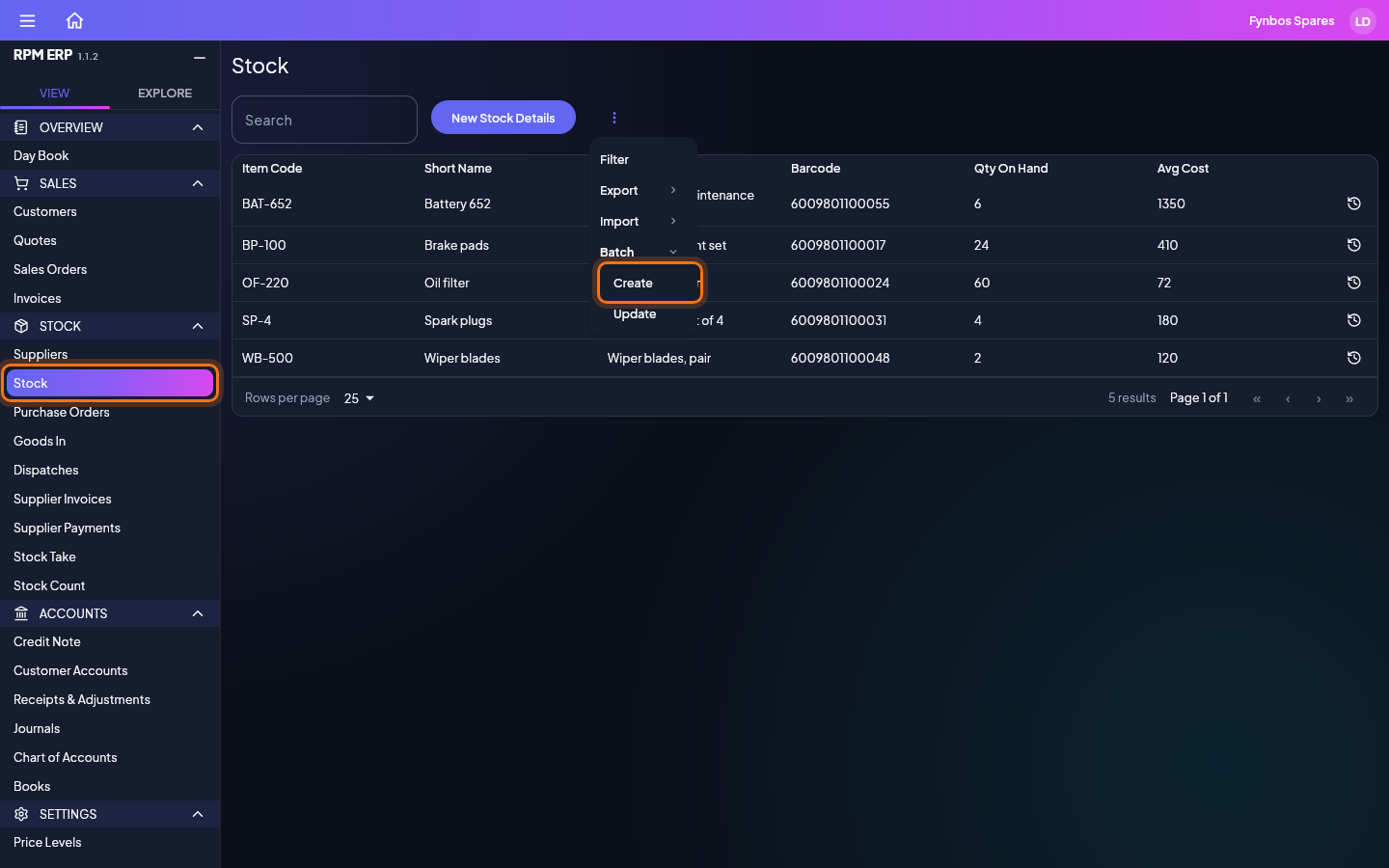
To add many stock items at once without a file, click Stock in the side menu, then More, the three dots beside the search box, then Batch, then Create. Batch is there for people who have been given Import, and only on lists that take an upload. Update, beside Create, opens the records the list is showing, to change them the same way.
Documents
Files to download, fill in and upload.
- CSVStock details import templateA sheet to fill in for Stock: the columns an upload reads, with 70 example items to replace. Item Code is ignored, as codes are made for you.4 KBDownload
- CSVSupplier details import templateA sheet to fill in for Suppliers: the columns an upload reads, with 30 example businesses to replace. Account No is ignored, as account numbers are made for you.2 KBDownload
- CSVCustomer details import templateA sheet to fill in for Customers: the columns an upload reads, with 25 example customers to replace. Account No is ignored, as account numbers are made for you.3 KBDownload