
Why run every company and branch in one system?
Because a business that grows rarely stays one business. A second shop opens, the workshop is split off from the parts counter, a partner brings in a company of their own, or a region gets its own manager and its own targets. If each of those needs its own system, you pay for each one, set each one up from nothing, train people on each one, and still can't look at them side by side. If they're all squeezed into a single set of records, the books blur together and everybody sees everything. A multi-company, multi-user system is the way between the two: one place and one sign-in, where each company or branch keeps what is its own, shares what should be shared, and you decide where that line falls.
What a growing business needs from its software
One sign-in for people who work in more than one place
A manager covers two shops. A bookkeeper does the accounts for three companies. The founder wants to look in on all of them. With a system per business, that's a password per business, an invitation per business, and one day a leaver who was taken off two systems and forgotten on the third. A person should be one account, given the places they work in and nothing else.
Records kept apart where they have to be
Each company has its own customers, its own suppliers and its own stock on its own shelves. It issues its own invoices, in its own number sequence, and answers for its own tax. Mix them, and a branch's debtors turn up in another branch's statement, or a sale is made against stock that was never in that shop.
What is the same everywhere, set up once
The chart of accounts, the groups that say who may do what, the extra details your trade records against a customer or an item. Setting these up again for every branch is wasted work, and copies drift apart: one branch posts to "Sales" and another to "Revenue", and the figures no longer compare.
Books for each business that stand on their own
A profit and loss for each branch tells you which one is earning its keep and which one is being carried. Separate books are also what an accountant, a bank, a franchisee or a buyer will ask for. Figures that can only be teased out of the whole with a spreadsheet and some guesswork won't be trusted, and shouldn't be.
Local settings for local branches
Branches sit in different time zones, round cash differently, count stock on different days and, across a border, charge a different rate of tax. One setting for everyone suits head office or suits the branch, rarely both.
Control over who sees what
A counter assistant needs quotes and invoices, not the books. A branch manager needs their branch, not the one across town. The more businesses share a system, the more this matters, and the more it has to be enforced by the system rather than left to good manners.
A branch that opens in minutes, and closes cleanly
Growth shouldn't wait on an IT project. Opening a branch should be a form, not a fortnight. And when a branch is closed, sold or merged, its records should be able to go with it, leaving the rest of the business exactly as it was.
A way to talk across the business
Questions between head office and the branches end up in personal phones and private email, where nobody else can find them later. Talking where the work is done keeps it with the business.
A price that grows with you
A second branch shouldn't cost as much as a second business, and adding one person shouldn't mean a new plan.
A view of the whole group
Sooner or later a group wants one set of figures for everything it owns: consolidated statements, and stock and sales across every branch at once. It is a real need, and (more on this below) one RPM doesn't meet yet.
How RPM does it
Every company and branch is a tenant
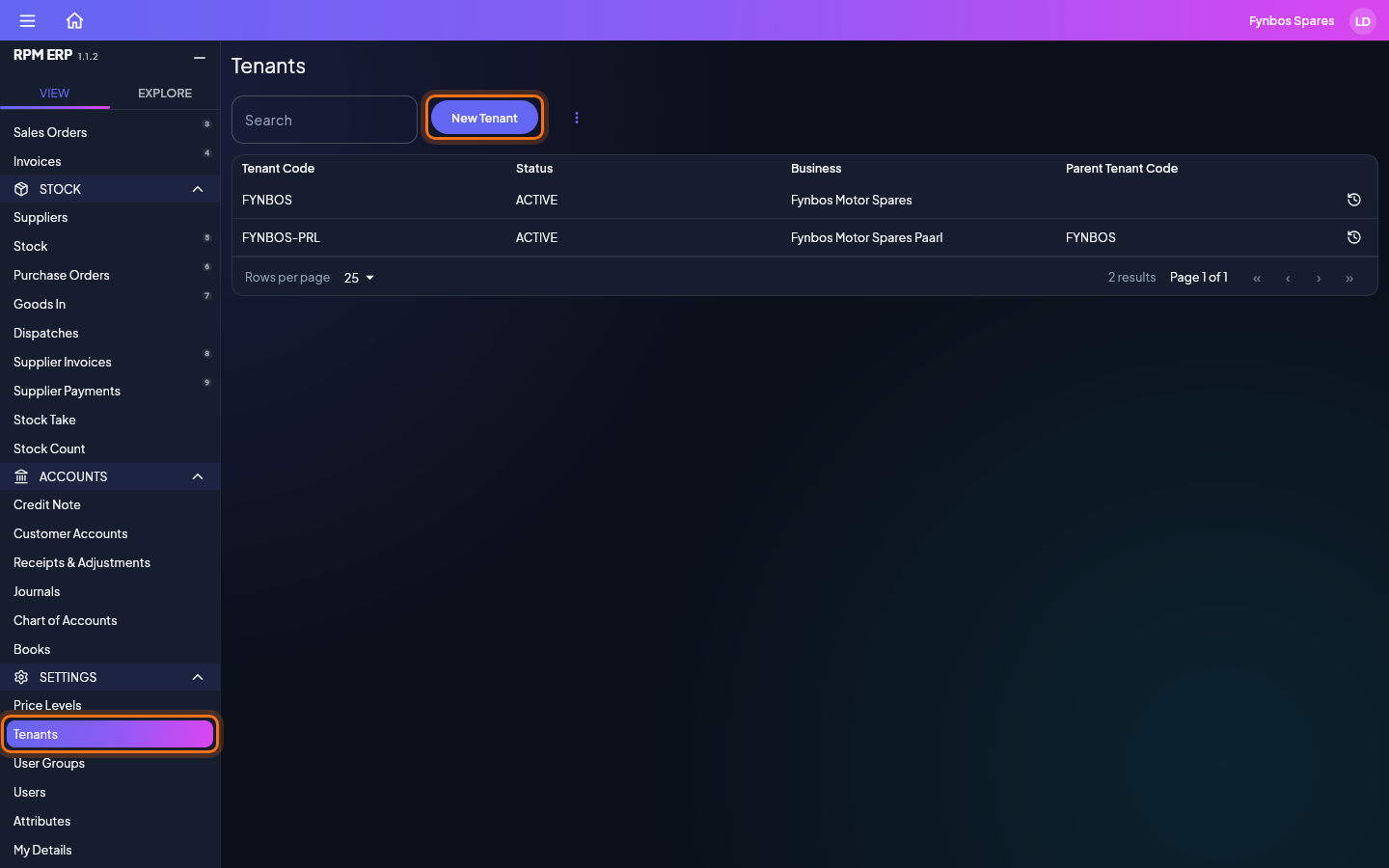
In RPM, each company or branch is a tenant: a space of its own, holding its customers, suppliers, stock, documents and books. Tenants sit in a tree. The company that signed up is at the top, its branches sit beneath it, and a branch can have branches of its own. A group of companies runs the same way, each company a tenant beneath the one at the top. In the side menu, Tenants lists your own tenant and every one beneath it.
Shared or split: you decide where the line goes
Some things belong to the whole company, and every branch reads and writes the same ones. Everything else belongs to the branch that holds it, and no other branch sees it.
| Shared by the whole company | Kept by each branch |
|---|---|
| Each person's sign-in, given the branches they work in | Customers and their accounts |
| User groups, and the screens each group may open | Suppliers |
| The chart of accounts | Stock, with its own prices and price levels |
| Your own extra fields (Attributes) | Quotes, sales orders, invoices, dispatches and credit notes |
| Two-factor sign-in, once switched on for the company | Purchase orders, goods in, supplier bills and payments |
| Journals and books: its own profit and loss, balance sheet and tax report | |
| Its own document numbers | |
| Its settings: tax rate, cash rounding, time zone, stock take, auto dispatch | |
| Its dashboards, saved scouts, history, files, imports and exports |
So the choice of what is shared and what is split is the choice of how you draw the tree:
- Shared. Two shops that sell from one pool of stock, to one list of customers, with one set of books, are one tenant. Everybody who works in either has their own sign-in to it.
- Split. A business that should keep its own customers, its own stock and its own books is a tenant of its own, beneath the company.
- Both. Most groups end up with a mix: a head office at the top, a tenant for each business that keeps its own figures, and the people, permissions and chart of accounts shared by all of them.
When a new branch sells the same range as an existing one, you don't type it all in again. In the first branch, export the stock, supplier or customer list as CSV for import; signed in to the new one, upload it. Each row becomes a record of the new branch, saved with every rule its screen has. A stock list carries a cost and selling price for each price level, so give the new branch the same price levels first. From then on each branch keeps its own copy, and its stock and prices go their own way.
One sign-in, as many branches as a person needs
Everyone has their own account: their name, the email address they sign in with, and the tenants they may sign in to. On Users, each account shows a chip for every tenant it can enter. Add a chip and that person can work there; take it away and they can't, and their account and everything they did stay just as they were. Only tenants you manage are offered.
When someone can enter more than one tenant, signing in asks which one. Their session is fixed to it for as long as they are signed in, the tenant's name sits at the top of every screen, and to work in another they sign out and back in. Nobody is ever unsure which business they are keying into.
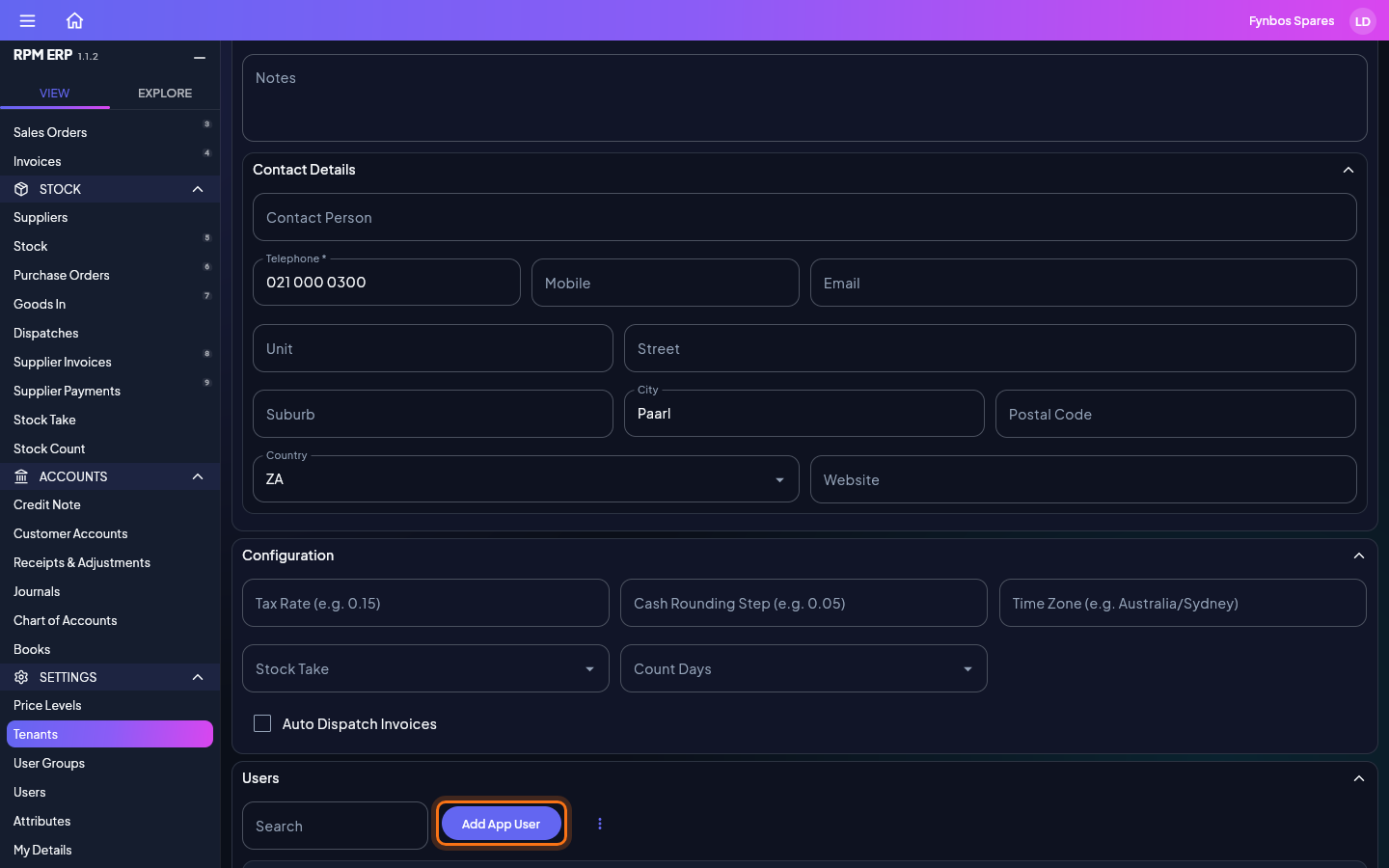
Head office can also add people straight to a branch: open the branch in Tenants, click Add App User, and the new person is linked to that branch and sent an invitation by email.
Permissions set once, for the whole company
User groups belong to the company. Make a group such as Sales or Accounts, tick the screens its members may view, edit or delete, and add the people. It applies in every branch those people sign in to, so a new branch needs no permissions of its own, and a change made once reaches every branch on the next request.
Two-factor sign-in works the same way. Switch it on for the company and every branch beneath it asks for a code too; or require it for a group, such as everyone who can see the books, or for one account. See Sign-in security.
Every branch keeps its own books
Every invoice, credit note, receipt, supplier bill and payment posts its own balanced double entry in the branch that issued it. The chart of accounts is the company's, so every branch posts to the same accounts by the same names, and its figures compare like for like with every other branch. The postings are the branch's alone, so its profit and loss, balance sheet, trial balance and tax report are its own, ready for its own accountant.
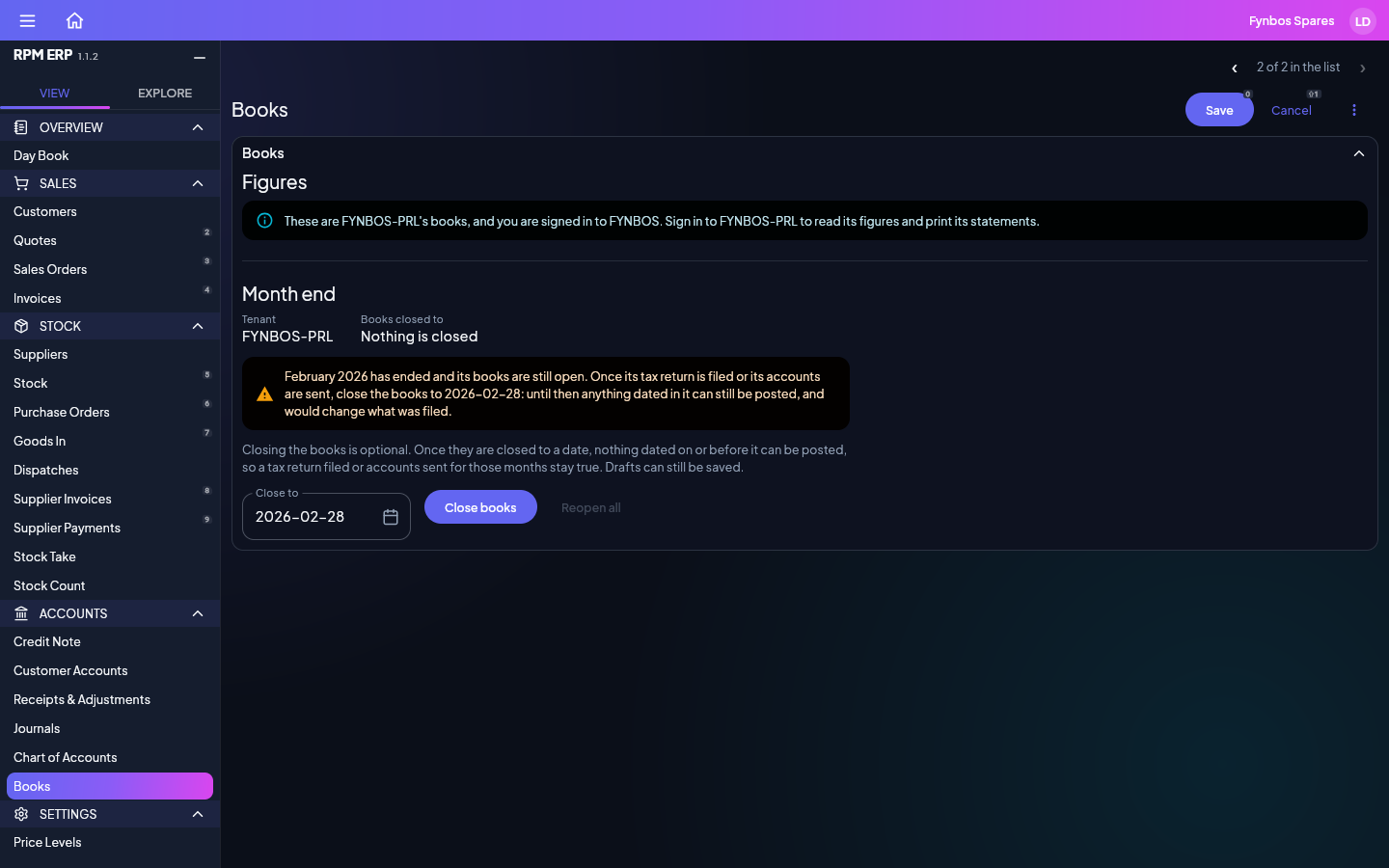
Head office can close a branch's month for it: on Books, the list holds the branch, and Close books locks it up to a date so nothing filed can change underneath it. Reading the branch's figures and printing its statements is done signed in to the branch.
Each branch's own settings
Open a branch in Tenants and its Configuration holds what is local to it:
- Tax rate, so a branch over a border charges the rate where it trades.
- Cash rounding step, the smallest coin it takes and gives in cash.
- Time zone, so "today" on its invoices and its history is the branch's own day, wherever the reader sits.
- Stock take: counting everything at once, or a share on each count day, and which days those are.
- Auto dispatch, whether an invoice paid in full sends its goods out by itself.
Each branch also has its own business details (name, registration and tax numbers, bank, address), and its own price levels and prices.
Insight that knows which branch it is in
The dashboards, Scout searches and the 360 sphere all read the tenant you are signed in to and nothing else, so a branch manager's dashboard is their branch's figures, and a scout saved in one branch is that branch's. The history of every change is kept per tenant too: who changed what, when, and what it was before.
Talking across the business
Messages reach the people of your own tenant, of the tenants above it and of the tenants below it: a branch can talk to head office, and head office to every branch. Conversations are private to the people in them. A branch doesn't reach the branch beside it directly; the company above both of them can.
Opening, moving and closing a branch
- Opening one takes a minute. On Tenants, click New Tenant, give it a business name, a short name and a telephone number, and save. It opens at once, its code is given to it, and you are linked to it. The company's chart of accounts, groups and extra fields are already there: nothing to set up again.
- Moving one. A branch's Parent Tenant says where it sits. Change it to move the branch beneath another tenant of yours when the business is reorganised; its records go with it.
- Closing one. When a branch closes or is sold, the company's founder can delete it on its own: its customers, stock, documents, books, files and history go, and the rest of the company is untouched. Export what you want to keep first. Why being able to delete your data matters says exactly what a delete removes.
Kept apart on the server, not just on the screen
The tenant someone works in is fixed when they sign in, on the server, and never taken from whatever the browser sends. Every request is checked against that tenant and the person's permissions, so a branch can't reach another branch's records by any route, and the same wall stands between your company and every other company on the shared server.
What it costs
On the shared server, the first six months are free, with every feature and no obligation. After that a company is $99 a month with its first user included, each extra branch is $89 a month, and each extra user $15 a month, in Australian dollars, excluding GST. See pricing.
What RPM doesn't do yet
- Consolidated statements. Each branch has its own profit and loss and balance sheet, but RPM doesn't yet add a group's branches into one.
- Reading a branch from head office. Head office manages a branch's settings, its people and its month end, but reads its figures, orders and stock by signing in to it.
- Moving stock between branches. There is no transfer document yet: stock sent from one branch to another has to be recorded in each of them separately.
- A list shared live between separate branches. Branches that need one customer list or one pool of stock have to be one tenant. Separate branches can copy a list by export and import, but the copies then go their own ways.
- Different permissions in different branches. A person's groups apply in every branch they work in. Someone who should edit in one branch and only look in another can't be set up that way yet.
- Several currencies. Every branch can have its own tax rate, but amounts carry no currency.
- Switching branch without signing out. Moving to another tenant means signing out and back in.
If one of these is what's holding you back, tell us at support@rpmcode.com. What customers ask for is what gets built next.
See it in under two minutes

What the video shows
- 0:07Your company and every branch beneath it, in one list
- 0:15A new branch opens at once, with the company's accounts and groups in place
- 0:24Each branch sets its own tax rate, time zone and stock take
- 0:31One sign-in for every branch a person works in
- 0:39Set a group's screens once: it applies in every branch
- 0:46Each branch keeps its own books, on the company's chart of accounts
- 0:55Message head office and the branches, privately
Read what the narrators say
Welcome to RPM. In the next two minutes, we'll see how one system runs every company and branch you own.
Under Tenants, you'll find your company and every branch beneath it. Each one keeps its own customers, stock, documents and books.
Opening a branch takes a minute. Give it a name and a phone number, and save. The company's chart of accounts and user groups are already there.
Each branch keeps its own settings: its tax rate, its time zone, and how it counts its stock.
Everyone has one sign-in, however many branches they work in. Add a branch to their account, and they choose where to work when they sign in.
Set up a group once, and tick the screens it may use. It applies in every branch its people sign in to.
Every branch keeps its own books, on the company's chart of accounts. Head office can close a branch's month, and its figures stay its own.
Messages reach your own branch, the company above it and the branches below, and stay private to the people in them.
One system for every company and branch. Get started at E R P dot RPM code dot com.
Each step links to its page of the user guide. The video plays from YouTube once you press Play; until then nothing on this page comes from YouTube.